
Get the most recent census data from the Basler Atlas

TL;DR;

Get the census data (and more) from the Basler Atlas that are updated by the Statistisches Amt Basel. The up-to-date version can be found on my GitHub Gists. Don’t forget to add the data source, i.e. the Stat. Amt Basel when you use their data. – it is being added automatically to the “meta” part in the datacontainer (in addition to the URL, the name and short name of the dataset).

Python
import datetime


headers = {'User-Agent': 'Mozilla/5.0'}


def data2csv(<em>data</em>,
             <em>outpath</em>='./',
             <em>prefix</em>='',
             <em>suffix</em>='',
             <em>filesep</em>='_',
             <em>datasep</em>=',',
             <em>ext</em>='.csv',
             <em>quiet</em>=True,
             ):

    import os
    if isinstance(data, <em>dict</em>) and 'data' not in data.keys():
        of = []
        for key in data.keys():
            _of = data2csv(data[key],
                           <em>outpath</em>=outpath,
                           <em>prefix</em>=prefix,
                           <em>filesep</em>=filesep,
                           <em>datasep</em>=datasep,
                           <em>ext</em>=ext,
                           <em>quiet</em>=quiet,
                           )
            if isinstance(_of, <em>list</em>):
                of += _of
            else:
                of.append(_of)
        return of

    outpath = os.path.expanduser(outpath)
    filename = filesep.join([prefix,
                             data['meta']['theme'],
                             data['meta']['subtheme'],
                             _nivgeo2nicename(data['meta']['nivgeo']),
                             suffix,
                             ])
    filename = filename.lstrip(filesep).rstrip(filesep) + ext
    os.makedirs(outpath, <em>exist_ok</em>=True)
    if not quiet:
        print('Saving as', outpath+filename)
    with open(outpath+filename, 'w') as file_obj:
        file_obj.writelines(datasep.join(data['header']) + '\n')

        datalines = [datasep.join(map(lambda <em>x</em>: <em>str</em>(x), line))
                     for line in data['data']]
        file_obj.writelines('\n'.join(datalines) + '\n')
    return outpath+filename


def _get_topic_url():
    url = 'https://www.basleratlas.ch/GC_listIndics.php?lang=de'
    return url


def _get_data_url():
    # used to be the first url at around 2018
    # "https://www.basleratlas.ch/GC_ronds.php?lang=de&js=1&indic=bevstruk.alter0&nivgeo=wge&ts=1&serie=2015"
    url = 'https://www.basleratlas.ch/GC_ronds.php'
    url = 'https://www.basleratlas.ch/GC_indic.php'
    return url


def _get_references_url():
    # e.g. https://www.basleratlas.ch/GC_refdata.php?nivgeo=wbl&extent=extent1&lang=de
    url = 'https://www.basleratlas.ch/GC_refdata.php'
    return url


def get_ref_data(<em>nivgeo</em>, <em>slimmed</em>=True):
    import requests
    payload = {'nivgeo': nivgeo,
               'lang': 'de', 'extent': 'extent1'}
    refs = requests.get(_get_references_url(),
                        <em>params</em>=payload,
                        <em>headers</em>=headers)
    refdata = refs.json()['content']['territories']
    # contains the actual numbering in the main geographical administrative
    # dataset that it can be linked against
    if slimmed:
        return refdata['libgeo'], refdata['codgeo']
    else:
        return refdata


def _replace_error_value(<em>value</em>, <em>error_value</em>, <em>replace_value</em>):
    return replace_value if value <= error_value else value


def get_basler_atlas_data(<em>nivgeo</em>,
                          <em>theme</em>,
                          <em>subtheme</em>,
                          <em>year</em>,
                          <em>quiet</em>=True,
                          <em>error_value</em>=-9999,
                          <em>replace_value</em>=0,
                          <em>empty_value</em>='',
                          ):
    import requests
    from requests.exceptions import JSONDecodeError

    payload = _params2payload(nivgeo, theme, subtheme, <em>year</em>=year)

    response = requests.get(_get_data_url(),
                            <em>params</em>=payload,
                            <em>headers</em>=headers)
    if response.ok:

        try:
            data = response.json()['content']['distribution']
        except JSONDecodeError:
            print(f'issues with {response.url} and the payload {payload}')
            return None, None
        if not quiet:
            print(f'Got data from {response.url}, transforming ...')

        values = data['values']

        if 'sortIndices' in data:
            # reported values are to be sorted, usual case?
            indices = data['sortIndices']
        else:
            # reported values are sorted already, usual case for Bezirk?
            indices = range(len(values))
        if isinstance(values, <em>dict</em>):
            keys = <em>list</em>(values.keys())
            indices = range(len(values[keys[0]]))
            values = [[_replace_error_value(values[key][i],
                                            error_value,
                                            replace_value,
                                            )
                      for key in keys]
                      for i in sorted(indices)
                      ]
            data = values
            return keys, data
        else:
            data = [<em>str</em>(_replace_error_value(values[i],
                                             error_value,
                                             replace_value,
                                             )
                        )
                    for i in sorted(indices)]
            return None, data
    else:
        if not quiet:
            print(f'Request for {payload} failed')
        return None, None


def _nivgeo2map(<em>nivgeo</em>):
    lookuptable = {'block': 'map5',
                   'wbl': 'map5',
                   'bezirk': 'map6',
                   'wbe': 'map6',
                   'viertel': 'map2',
                   'wvi': 'map2',
                   'gemeinde': 'map3',
                   'wge': 'map3',
                   # 'wahlkreis': 'map7',
                   # 'pwk': 'map7',
                   }

    return lookuptable[nivgeo]


def _get_nivgeos():
    return 'wbe', 'wvi', 'wge', 'wbl'  # , 'pwk'


def _nicename2nivgeo(<em>nivgeo</em>=None):
    nicenames = _nivgeo2nicename(<em>nivgeo</em>=nivgeo)
    if nivgeo is None:
        return {v: k for k, v in nicenames.items()}
    else:
        return {nicenames: nivgeo}


def _nivgeo2nicename(<em>nivgeo</em>=None):
    names = {'wbe': 'bezirk',
             'wvi': 'viertel',
             'wge': 'gemeinde',
             'wbl': 'block',
             # 'pwk': 'wahlkreis',
             }

    if nivgeo is None:
        return names
    else:
        return names[nivgeo]


def _params2payload(<em>nivgeo</em>,
                    <em>theme</em>,
                    <em>subtheme</em>,
                    <em>year</em>=None):

    payload = {'lang': 'de',
               'dataset':  theme,
               'indic': subtheme,
               'view': _nivgeo2map(nivgeo),
               }

    if year is not None:
        payload['filters'] = 'jahr='+<em>str</em>(year)

    return payload


def get_basler_atlas(<em>start_year</em>=1998,
                     <em>end_year</em>=datetime.date.today().year,
                     # population has different ages,
                     # men m , women w and a grand total
                     <em>themes</em>={'bevstruk': ['alter0',
                                          'alter20',
                                          'alter65',
                                          'w',
                                          'm',
                                          'gesbev'],
                             'bevheim': ['anteil_ch',
                                         'anteil_bs',
                                         'anteil_al',
                                         'anteil_bsanch',
                                         # "gesbev" has been replaced by
                                         'gesbev_f',
                                         ],
                             'bau_lwg': ['anzahl_lwg',
                                         ],
                             },
                     <em>geographical_levels</em>='all',
                     <em>error_value</em>=-9999,
                     <em>replace_value</em>=0,
                     <em>testing</em>=False,
                     <em>quiet</em>=True,
                     ):
    _nicenames = _nicename2nivgeo()

    if geographical_levels == 'all':
        nivgeos = _get_nivgeos()
    else:
        if isinstance(geographical_levels, <em>str</em>):
            geographical_levels = [geographical_levels]
        _nivgeos = _get_nivgeos()

        nivgeos = [i if i in _nivgeos else _nicenames[i]
                   for i in geographical_levels]

        assert all([i in _nivgeos or i in _nicenames
                    for i in nivgeos])

    # the defaults that we know of - there is wahlbezirke too on the
    # atlas but we don't particularly care about that one...
    data = {}
    
    # mapping of information from topic url to meta information entries
    info2meta = {'url': 'c_url_indicateur',
                 'name': 'c_lib_indicateur',
                 'short_name': 'c_lib_indicateur_court',
                 'unit': 'c_unite',
                 'source': 'c_source',
                 'description': 'c_desc_indicateur',
    }
    for nivgeo in nivgeos:
        refname, refnumber = get_ref_data(nivgeo)
        refdata = [[_refname, _refnumber]
                   for _refname, _refnumber in zip(refname, refnumber)]
        # ids of the nivgeo is in refdata['codgeo']
        # names of the nivgeo is in refdata['libgeo']
        nicename = _nivgeo2nicename(nivgeo)

        for theme in themes:
            if not quiet:
                print(f'Working on {theme} for {_nivgeo2nicename(nivgeo)}')
            for subtheme in themes[theme]:
                if not quiet:
                    print(f'Working on {theme}.{subtheme} for ',
                          f'{_nivgeo2nicename(nivgeo)}')
                # force a copy of refdata otherwise we keep updating the old list of lists.
                container = {'data': [i.copy() for i in refdata],
                             'meta': {'theme': theme,
                                      'nivgeo': nivgeo,
                                      'subtheme': subtheme,
                                      'theme': theme, },
                             'header': ['referencename', 'referencenumber'],
                             }
                topicinfo = get_basler_atlas_topics(<em>theme</em>=theme,
                                                    <em>subtheme</em>=subtheme,
                                                    <em>fullinfo</em>=True)
                for key, value in info2meta.items():
                    container['meta'][key] = topicinfo[theme][subtheme][value]

                # values will be nested, adjust header line with extra
                for year in range(start_year, end_year+1):

                    if not quiet:
                        print(f'Getting data for {year} for {theme}',
                              f'{subtheme} for {_nivgeo2nicename(nivgeo)}')

                    keys, thisdata = get_basler_atlas_data(nivgeo,
                                                           theme,
                                                           subtheme,
                                                           year,
                                                           <em>quiet</em>=quiet,
                                                           )
                    if thisdata is None:
                        if not quiet:
                            print(f'Failure to get data for {year} for {theme}',
                                  f'{subtheme} for {_nivgeo2nicename(nivgeo)}')
                        thisdata = [''] * len(container['data'])

                    if keys is None:
                        container['header'] += [f'{year}']
                    else:
                        container['header'] += [f'{year}_{key}'
                                                for key in keys]

                    for i, value in enumerate(thisdata):
                        if not isinstance(value, <em>list</em>):
                            value = [value]
                        container['data'][i] += value

                    if testing:
                        break  # year

                data[nicename+'_'+theme+'_'+subtheme] = container

                if testing:
                    break  # specific theme
            if testing:
                break  # theme
        if testing:
            break  # nivgeo

    return data


def get_basler_atlas_topics(<em>theme</em>=None,
                            <em>subtheme</em>=None,
                            <em>fullinfo</em>=False):
    import requests
    if subtheme is not None and isinstance(subtheme, <em>str</em>):
        subtheme = [subtheme]
    payload = {"tree": "A01", 'lang': 'de'}
    if theme is not None:
        payload['theme'] = theme
    response = requests.get(_get_topic_url(),
                            <em>params</em>=payload,
                            <em>headers</em>=headers)
    topiclist = response.json()['content']['indics']

    data = {}
    for topicinfo in topiclist:
        maintopic, subtopic = (topicinfo['c_id_dataset'],
                               topicinfo['c_id_indicateur'])
        if maintopic not in data:
            if fullinfo:
                data[maintopic] = {}
            else:
                data[maintopic] = []

        if subtheme is not None and subtopic not in subtheme:
            continue
        if fullinfo:
            data[maintopic][subtopic] = topicinfo
        else:
            data[maintopic] += [subtopic]

    return data
  
if __name__ == '__main__':
  print("""
        Some example usages:
        # get some information for the population for the years 200 to 2003
        data = get_basler_atlas(end_year=2003, 
                                start_year=2000, 
                                themes={'bevheim': ['anteil_ch','anteil_bs', ]},
                                geographical_levels='wvi',
                                quiet=True)
        # just get everything that is a predefined topic: 
        themes={'bevstruk': ['alter0',
                             'alter20',
                             'alter65',
                             'w',
                             'm',
                             'gesbev'],
                'bevheim': ['anteil_ch',
                            'anteil_bs',
                            'anteil_al',
                            'anteil_bsanch',
                            # "gesbev" has been replaced by
                            'gesbev_f',
                            ],
                'bau_lwg': ['anzahl_lwg',
                            ],
        }
        # limit just by years
        data = get_basler_atlas(themes=themes, start_year=2000, end_year=2010)
        # also save the data to csv files (by theme and subtheme)
        data2csv(data)
        # get some information regarding the available topics
        themes = get_basler_atlas_topics()
        """)

In the years of 2014 to 2020 or so I was teaching “An introduction to Geoinformatics” at the University of Basel. As a starter, students were supposed to load data of the administrative units of Basel in the form of shapefiles into a GIS (ArcMap or QGIS, I gave support in both) and connect these with population data (age groups or similar). These data can be downloaded from the Statistisches Amt Basel, usually in the form of Excel sheets – which is doable for a GIS but not great to be used: Sometimes I even struggled with getting the right separator in the excel sheet to be automatically recognised for the later import (which is just one reason why I prefer QGIS). However, the updated numbers were sometimes published later than when I’d like to use them – even though the Basler Atlas already had them. So I went to work to scrape the data directly from this source, because I did not want to manually download the data each and every semester again and for several dataset individually. We can do better than that.

In the back, the Basler Atlas uses geoclip, a product from a French company (you also see their logo when opening the Atlas). Relevant for me was that with the browser inspect feature you can get the requests being made in the back and see where the data are coming from (you can of course also click on the request to see the direct answer)
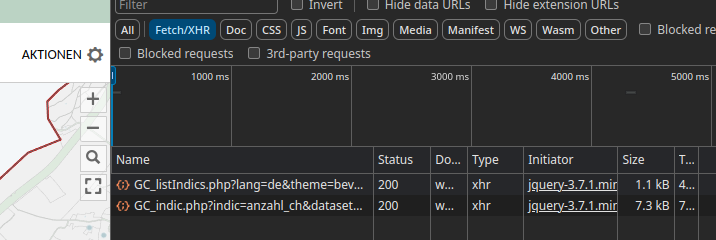
As you can see there is a listIndics and a indic API endpoint. ListIndics gives an overview of datasets, indic gives the data of the “indices”. Both require some specific payload to work, the most important being {‘lang’: ‘de’}. There is however a third endpoint that gives the crucial reference information, namely the name/id of the administrative feature at GC_refdata.php. Initially, I only used the indic endpoint to collect the data directly and the ref to get the reference frame. Combining requests to both, the data can be collected automatically, either to update or for the first time and come back in dict, including a headerline and meta information for the later export (also included above). Now you can get your up-to-date data from the Basler Atlas as well and have a better time using it for temporal analysis by running the above code and then calling this or something like this

Python
data = get_basler_atlas(<em>geographical_levels</em>='block',
                        <em>themes</em>={'bevstruk': ['alter0',
                                             'alter20',
                                             'alter65',
                                             'w',
                                             'm',
                                             'gesbev'], },
                        <em>quiet</em>=True)

This gives you the population data on the block level of the years from 1998 until today (2024 as of this writing). Calling the below saves the data to your home directory, namely 6 CSV files.

Python
data2csv(data, <em>outpath</em>='~/')

Today I extended the code above to also get the available topics (i.e. the categories). Which allows us to discover topics or download data that would require some time to find otherwise.

Python
geolevel = 'block'

for key, values in topics.items():
    if key != 'bevstruk':
        continue
    data = get_basler_atlas(<em>themes</em>={key: values},
                         <em>quiet</em>=True,
                         <em>geographical_levels</em>=geolevel)
    of = data2csv(data, <em>outpath</em>='~/')
    break

As always, I hope this helps someone to discover data or save some time for themselves. And maybe at some point, I’ll find the time to document everything a bit better. Don’t forget to add the data source, i.e. the Stat. Amt Basel when you use their data.

Update/Fix

As I noticed today, there was some issue with the previous version of this script, namely a “deepcopy” issue that led to the fact, that the datacontainer had data from all connected subthemes when more than one was requested. Ups. But it should be fine now, the gist on top is updated and some usage information is added as well. 🙂

Linked data (LINDAS/SPARQL/hydrodata)

TL;DR;

Get the up-to-date data from LINDAS of the currently available values discharge / water level/water temperatures for all BAFU stations.

SPARQL
PREFIX schema: <em><http://schema.org/></em>
PREFIX hg: <em><http://rdf.histograph.io/></em>
PREFIX la: <em><https://linked.art/ns/terms/></em>
prefix ex: <em><http://example.org/></em>

# hydro related prefixes
prefix h: <em><https://environment.ld.admin.ch/foen/hydro/></em>
prefix hd: <em><https://environment.ld.admin.ch/foen/hydro/dimension/></em>
prefix hgs: <em><https://environment.ld.admin.ch/foen/hydro/station/></em>
prefix river: <em><https://environment.ld.admin.ch/foen/hydro/river/observation/></em>
prefix lake: <em><https://environment.ld.admin.ch/foen/hydro/lake/observation/></em>

# geo related prefixes
prefix wkt: <em><http://www.opengis.net/ont/geosparql#asWKT></em>

# hydrodata related prefixes (fake) that we use to reference to the historical data. 
prefix hydrodata: <em><https://www.hydrodaten.admin.ch/plots/></em>


# what we want to get out of the query as "nicely" formatted data
SELECT ?station_id ?station_name ?station_type ?station_type_nice
    ?latitude ?longitude 
    ?station_iri ?station_data_iri ?station_geometry_iri
	  (group_concat(?measurement_type_measurement_value;SEPARATOR<em>=</em>";") as ?data)
		#?hydrodata_url_temperature ?hydrodata_url_discharge_waterlevel
		?query_time 
		# add the https://hydrodaten.admin.ch url for the data that go back 
		# 7 days (actually 40 days sometimes, see dev console)
  		(if(contains(?data,"discharge"), 
  		    uri(concat(str(hydrodata:), 'p_q_7days/',
  		               ?station_id, '_p_q_7days_de.json')), 
          "") 
    		as ?hydrodata_url_discharge_waterlevel)
        (if(contains(?data,"temp"), 
            uri(concat(str(hydrodata:), 'temperature_7days/', 
                ?station_id, '_temperature_7days_de.json')), 
           "") 
    	as ?hydrodata_url_temperature)
 
where {
  		# it seems counterintuitive but getting everything and filtering 
  		# is faster than first getting 
  		# the stationlist and go trough their IRI
        ?station ?prop ?value.
  		# we only want to keep actual data variables and time
        filter( ?prop in (ex:isLiter, hd:measurementTime, hd:waterTemperature,  hd:waterLevel, hd:discharge))
  		# convert the subject station to the id, which is the last thing after the /;
  		bind(replace(replace(
        	str(?station), str(river:), "", "i"),
      		str(lake:), "", "i")
    		as ?station_id)
  		# the above is equivalent to this in theory but the above 
  		# uses prefixes so would be easier to change
		# in case of changes
  		#bind(strafter(str(?station), "observation/") as ?station_id2)
  		# get the kind of station this is (whether lake or river) 
  		# - the hierarchy/ontology here is weird as all are measurement stations
		# or observation but the distinction is river/lake first then observation
  		bind(strbefore(strafter(str(?station), str(h:)), "/") as ?station_type)
  		# uppercase the first letter -> why is there no capitalize function in SPARQL
  		bind(concat(ucase(substr(?station_type,1,1)), substr(?station_type,2,strlen(?station_type)-1)) as ?station_type_nice)
  		# remove some filler words from the data
		bind(replace(str(?prop), str(hd:), "", "i") as ?measurement_type)
  		# convert the actual measurement value to a literal
        bind(str(?value) as ?measurement_value)
  		# introduce the time of the query to (maybe) see if the values are old
        bind( str(now()) as ?query_time)
  		# combine the type of measurement with the value so we 
  		# can group by and not loose information
  		bind(concat(?measurement_type, ';', ?measurement_value, '') as ?measurement_type_measurement_value) 
    	
  		# start making IRIs so we can check/link back to lindas
  		# the IRI containing information of the station itself (not linked to river/lake)
  		bind(IRI(concat(str(hgs:), ?station_id)) as ?station_iri)
  		# generate the geometry IRI
  		bind(IRI(concat(str(hgs:), concat(?station_id,"/geometry"))) as ?station_geometry_iri)
  		# generate the station IRI that holds the data information
  		bind(IRI(concat(str(h:), ?station_type, "/observation/", ?station_id)) as ?station_data_iri)
  		# get the information about the location of the station
  		?station_geometry_iri wkt: ?coordinates.
  		# also get the name and remove commas to not confuse them with seps
      ?station_iri schema:name ?stat_name.
      bind(replace(?stat_name, ',', ';') as ?station_name)

  		# simplifiy the geometry to lon/lat in array form
        BIND(STRBEFORE(STRAFTER(STR(?coordinates), " "), ")") AS ?latitude)
        BIND(STRBEFORE(STRAFTER(STR(?coordinates), "("), " ") AS ?longitude)


}
# group by, basically keep everything of the select here
# except the ?measurement_type_measurement_value which we want to combine to one row
# (ideally we would actually get them as seperate columns again but this seems the best we can do for the moment
group by # the station information
		?station_id ?station_type ?station_type_nice ?station_name 
		?latitude ?longitude
		# the IRIs
		 ?station_iri ?station_data_iri ?station_geometry_iri
		# validation information
		 ?query_time   

This one took quite some time and serves as of now not much purpose other than training SPARQL for me. Essentially, I was asked once to use “the API” for the current water temperatures that are embedded in my RaspberryPI webcams.

Now, initially I actually “webscapped” the JSON data from hydrodata and transferred them to the MCR database as this allowed the concurrent use of in-house data with the BAFU data. Additionally, the urban/rural/water temperature graph of dolueg2 uses exactly the same temperature, meaning it makes sense to keep it in the same database (at least for some of the relevant stations around Basel, the B2091 means BAFU station 2091).

Now going back to “the API” and RDF where data are in triplet form (subject property object) to allow reuse and linking we can get the most recent data of any of the BAFU stations, via e.g.

SPARQL
prefix hd: <em><https://environment.ld.admin.ch/foen/hydro/dimension/></em>
SELECT <em>*</em> WHERE {
  <em><https://environment.ld.admin.ch/foen/hydro/river/observation/2091></em> hd:waterTemperature ?obj .
}
# see also the page: https://environment.ld.admin.ch/foen/hydro/river/observation/2091

or some relevant values for us (more than water temperature)

SPARQL
prefix hd: <em><https://environment.ld.admin.ch/foen/hydro/dimension/></em>
prefix obs: <em><https://environment.ld.admin.ch/foen/hydro/river/observation/></em>


SELECT <em>*</em> WHERE {
  obs:2091 ?prop ?obj .
  filter( ?prop in (hd:measurementTime, hd:waterTemperature,  hd:waterLevel, hd:discharge))

}

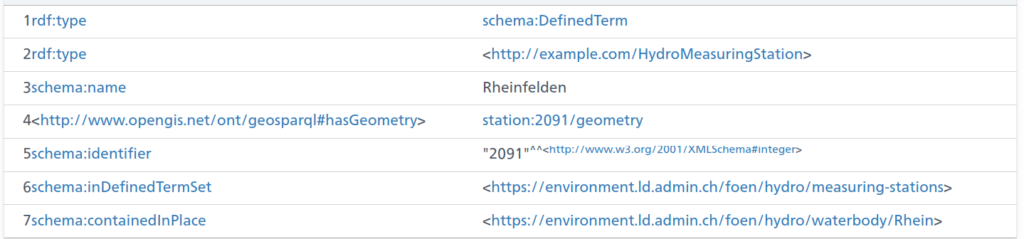
The above is an excerpt of the output from the LINDAS SPARQL endpoint at the time of writing. Notably, we can also get the information for the station (note the added prefix):

SPARQL
prefix station: <em><https://environment.ld.admin.ch/foen/hydro/station/></em>
SELECT <em>*</em> WHERE {
  station:2091 ?prop ?obj .
}

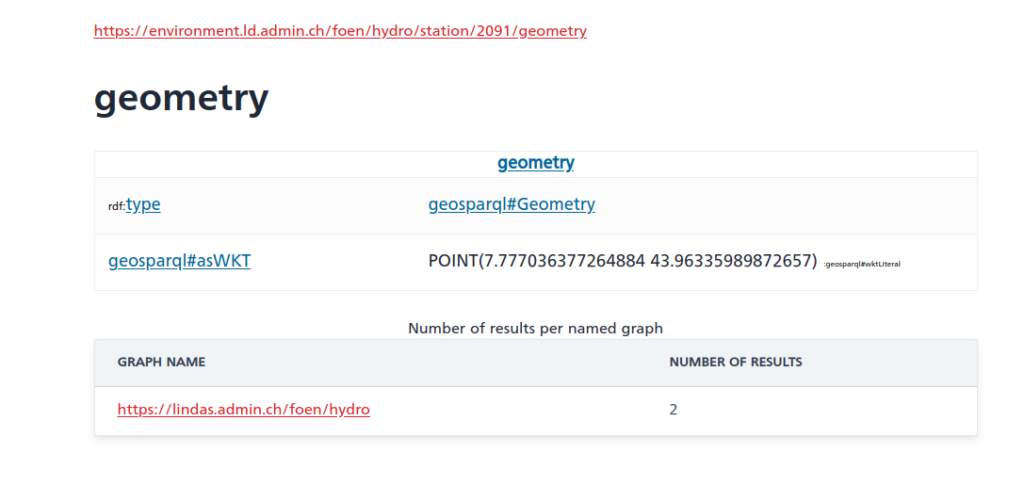
And as you can see, there is also a geometry linked to the station data (shown without query this time):

Cool – except for the fact that the southernmost point of Switzerland is located at 45°49’N. And the station in question (id 2091) is in Rheinfelden, i.e. in the North of Switzerland. So something seems off here and I informed the responsible person in the hopes that they’ll fix that soon.

Now, initially, I thought I’d first extract the IDs of the relevant station, then get their properties of interest/values but somehow the query runs rather slow (6+ seconds); probably this could be fixed and if someone wants to try, the following should give a nicely formatted data table (I actually assume that eventually the trigger for measurement time might not be a good choice when more and more datasets would be available on LINDAS):

SPARQL
PREFIX rdf: <em><http://www.w3.org/1999/02/22-rdf-syntax-ns#></em>
PREFIX rdfs: <em><http://www.w3.org/2000/01/rdf-schema#></em>
PREFIX xsd: <em><http://www.w3.org/2001/XMLSchema#></em>
# hydro related prefixes
prefix h: <em><https://environment.ld.admin.ch/foen/hydro/></em>
prefix hd: <em><https://environment.ld.admin.ch/foen/hydro/dimension/></em>
prefix hydro_geo: <em><https://environment.ld.admin.ch/foen/hydro/station/></em>
# geo related prefixes
prefix wkt: <em><http://www.opengis.net/ont/geosparql#asWKT></em>

select ?station_iri ?station_id ?station_type ?coordinates ?station_coordinates ?query_time ?measurement_time ?waterTemperature ?discharge ?waterLevel 
where {
  
    ?station hd:measurementTime ?measurement_time.
    optional {?station hd:waterLevel ?waterLevel. }
    optional { ?station hd:discharge ?discharge.}
  	optional { ?station hd:waterTemperature ?waterTemperature.}
  # measurement related things
  bind(now() as ?query_time)
  bind(strbefore(strafter(str(?station), str(h:)), "/") as ?station_type)
  bind(strafter(str(?station), "observation/") as ?station_id)
  # geo related things
  # first find all the relevant subjects, i.e. station property pages
  bind(IRI(concat(str(hydro_geo:), concat(?station_id,"/geometry"))) as ?station_geometry_iri)
  bind(IRI(concat(str(hydro_geo:), ?station_id)) as ?station_iri)
  ?station_geometry_iri wkt: ?coordinates.
  BIND(strafter(strbefore(str(?coordinates),")"), "POINT(") AS ?station_coordinates)
  # can be used for yasgui and nicer representation but slows the query
  #bind(xsd:decimal(?station_id) as ?station_id_numeric)
} 
#order by desc(?station_id_numeric)
 

As you can see, it’s important to use the OPTIONAL keyword as not all stations have all variables (water temperature / discharge / level). Additionally, I retrieve the kind of station (lake/river) that is available. The choice of prefix for these is a bit weird for my feeling as the hierarchy seems to be river/lake then station instead of the other way around – which must have a reason that I’m too inexperienced to understand. The rest of the query is cosmetics to get a bit nicer values (keep the geometry as proper type and you can get a map of the observations though).

As seen, this runs rather slow (6+ seconds for around 230 records is too slow on any day) so I started experimenting, arriving ultimately at the code at the top (here shortened to remove geometry and hydrodata links) by first filtering out the relevant dimensions, essentially getting the data first, then cleaning up a bit and concatenating by station id.

SPARQL
PREFIX schema: <em><http://schema.org/></em>
PREFIX hg: <em><http://rdf.histograph.io/></em>
PREFIX la: <em><https://linked.art/ns/terms/></em>
prefix ex: <em><http://example.org/></em>

# hydro related prefixes
prefix h: <em><https://environment.ld.admin.ch/foen/hydro/></em>
prefix hd: <em><https://environment.ld.admin.ch/foen/hydro/dimension/></em>
prefix hgs: <em><https://environment.ld.admin.ch/foen/hydro/station/></em>
prefix river: <em><https://environment.ld.admin.ch/foen/hydro/river/observation/></em>
prefix lake: <em><https://environment.ld.admin.ch/foen/hydro/lake/observation/></em>

# geo related prefixes
prefix wkt: <em><http://www.opengis.net/ont/geosparql#asWKT></em>


# what we want to get out of the query as "nicely" formatted data
SELECT ?station_id ?station_name ?station_type ?station_type_nice ?station_iri ?station_data_iri 
	  (group_concat(?measurement_type_measurement_value;SEPARATOR<em>=</em>", ") as ?data)
		#?hydrodata_url_temperature ?hydrodata_url_discharge_waterlevel
		?query_time  
where {
  		# it seems counterintuitive but getting everything and filtering is faster than first getting 
  		# the stationlist and go trough their IRI
        ?station ?prop ?value.
  		# we only want to keep actual data variables and time
        filter( ?prop in (hd:measurementTime, hd:waterTemperature,  hd:waterLevel, hd:discharge))
  		# convert the subject station to the id, which is the last thing after the /;
  		bind(replace(replace(
        	str(?station), str(river:), "", "i"),
      		str(lake:), "", "i")
    		as ?station_id)
  		# the above is equivalent to this in theory but the above uses prefixes so would be easier to change
		# in case of changes
  		#bind(strafter(str(?station), "observation/") as ?station_id2)
  		# get the kind of station this is (whether lake or river) - the hierarchy/ontology here is weird as all are measurement stations
		# or observation but the distinction is river/lake first then observation
  		bind(strbefore(strafter(str(?station), str(h:)), "/") as ?station_type)
  		# uppercase the first letter -> why is there no capitalize function in SPARQL (╯°□°)╯︵ ┻━┻
  		bind(concat(ucase(substr(?station_type,1,1)), substr(?station_type,2,strlen(?station_type)-1)) as ?station_type_nice)
  		# remove some filler words from the data
		bind(replace(replace(replace(
            str(?prop), str(hd:), "", "i"),
            "water", "", "i"),
            "measurementTime", "measurement_time", "i") 
            as ?measurement_type)
  		# convert the actual measurement value to a literal
        bind(str(?value) as ?measurement_value)
  		# introduce the time of the query to (maybe) see if the values are old
        bind( str(now()) as ?query_time)
  		# combine the type of measurement with the value so we can group by and not loose information
  		bind(concat(?measurement_type, ': ', ?measurement_value, '') as ?measurement_type_measurement_value) 
    	
  		# start making IRIs so we can check/link back to lindas
  		# the IRI containing information of the station itself (not linked to river/lake)
  		bind(IRI(concat(str(hgs:), ?station_id)) as ?station_iri)


}
# group by, basically keep everything of the select here
# except the ?measurement_type_measurement_value which we want to combine to one row
# (ideally we would actually get them as seperate columns again but this seems the best we can do for the moment
group by # the station information
		?station_id ?station_type ?station_type_nice ?station_name 
		# the IRIs
		 ?station_iri ?station_data_iri
		# validation information
		 ?query_time   

This query is the reduced version of the one on top. It runs in around 1 second or less and can now be used for automated queries or other products as described here on LINDAS. The only additions are the added geometry and the URLs for the hydrodata website that give you the historical data to implement a product I have in mind that might come up later. And maybe at some point, we can also get data from the past on LINDAS, making the project I have in mind easier.

Update:
The offset in the geometry seems to be consistently 400’000 m in “hochwert”/latitude based on three stations picked from hydrodata and LINDAS where longitude is almost correct:

Python
b = 2634026 , 1125901 # 2531
a = 7.854351126515431, 42.67878915566025 # 2531
a = wgs84_to_ch1903(*a[::-1], <em>plus</em>=True)[::-1]
print([i - j for i, j in zip(a, b)])
#out: [132.7675012690015, -401020.22037598956]

b = 2627189 , 1267845 # 2091
a = 7.777036377264884, 43.96335989872657 # 2091
a = wgs84_to_ch1903(*a[::-1], <em>plus</em>=True)[::-1]
print([i - j for i, j in zip(a, b)])
#out: [1.471713425591588, -399994.8737920185]

b = 2830800 , 1168706 # 2617
a = 10.265672193049967, 43.036021653211186 # 2617
a = wgs84_to_ch1903(*a[::-1], <em>plus</em>=True)[::-1]
print([i - j for i, j in zip(a, b)])
#out: [48.71478863572702, -399969.5114403835]

My implementation of a touchdown event via javascript

TL;DR; The below code can be added as a script to your page to implement a touchdown event detection and directly attach it to a “menu” element

JavaScript
async function swipedetect(el, callback, threshold=50, minimumTime=150, allowedTime=2000){

    var touchsurface = el,
    swipedir,
    startX,
    startY,
    distX,
    distY,
    threshold = threshold, //required min distance traveled to be considered swipe in X
//    restraintX = restraintX, // maximum distance allowed at the same time in perpendicular direction in X
//    thresholdY = thresholdY, //required min distance traveled to be considered swipe in Y
//    restraintY = restraintY, // maximum distance allowed at the same time in perpendicular direction in Y
    minimumTime = minimumTime, // maximum time allowed to travel that distance
    allowedTime = allowedTime, // maximum time allowed to travel that distance
    elapsedTime,
    startTime,
    handleswipe = callback || function(swipedir){}

    touchsurface.addEventListener('touchstart', function(e){
        var touchobj = e.changedTouches[0]
        swipedir = 'none'
        dist = 0
        startX = touchobj.pageX
        startY = touchobj.pageY
        startTime = new Date().getTime() // record time when finger first makes contact with surface
        // e.preventDefault()
    }, false)

    touchsurface.addEventListener('touchmove', function(e){
        e.preventDefault() // prevent scrolling when inside DIV
    }, false)

    touchsurface.addEventListener('touchend', function(e){
        var touchobj = e.changedTouches[0]
        distX = touchobj.pageX - startX; // get horizontal dist traveled by finger while in contact with surface
        distY = touchobj.pageY - startY; // get vertical dist traveled by finger while in contact with surface
        dist = distY * distY + distX * distX;
        dist = Math.sqrt(dist);
        elapsedTime = new Date().getTime() - startTime; // get time elapsed
        // calculate the angle of the movement
        angle = (Math.atan2(distY, distX) / Math.PI * 180)
        // convert angle to a sector of the movement
        // offsetting it by 45 degreees to get the movement easier.
        // and ensuring its positive
        sector = (angle + 45 + 360) % 360;
        sector = Math.floor(sector/90);
        if (elapsedTime >= minimumTime && elapsedTime <= allowedTime && dist >= threshold){ // first condition for a swipe met
            switch (sector) {
               case 0: swipedir = "right"; break;
               case 1: swipedir = "up"; break;
               case 2: swipedir = "left"; break;
               case 3: swipedir = "down"; break;
            }
        }
        handleswipe(swipedir)
        if (dist >= threshold) {
          e.preventDefault()
        }
    }, false)
}

async function swipe_enable(elementid='menu', table={'right':'a', 'up':'w', 'left':'d', 'down':'s', 'none': null}) {
  var el = document.getElementById(elementid);
  if (el) {
    swipedetect(el, async function(swipedir){
      //swipedir contains either "none", "left", "right", "top", or "down"
      let key = table[swipedir];
      document.dispatchEvent(new KeyboardEvent('keypress', {'key': key}));
    })
  }
}

Handling a touchdown event via vanilla JS is nothing new, and I also took the initial implementation from a website I cannot find anymore. The structure was similar to this gist and the related discussion, as in initially I simply added a touchdown but the detection of right/left/up/down was patchy until I also added the direction sector. Additionally, I did not want to attach it all the time to each element etc. but instead added another function that handles the attaching.

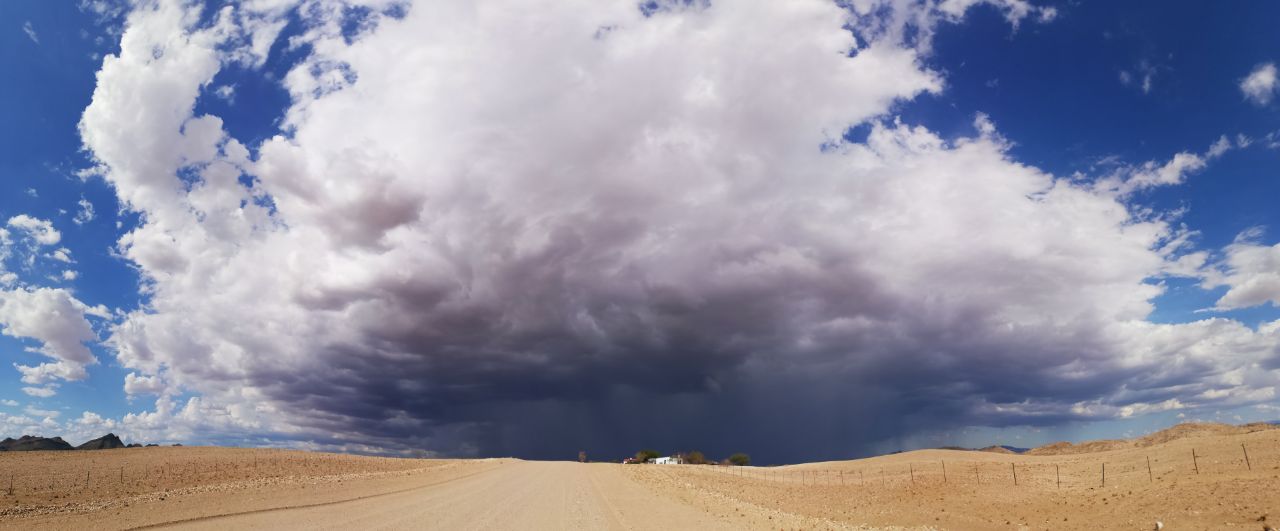
Now I can simply have the above in a js-lib file and source it on our data visualisation page, then call swipe_enable() in the doc.ready function and be certain that swiping is handled on the corresponding element (with selects in this case). This makes usage of the page far easier on mobile devices; highly relevant if you are in the field like in CLOUDLAB and your phone is the only thing available due to the windy/rainy/snowy weather.

geo utils – get altitude profile data from swisstopo

Summary & code

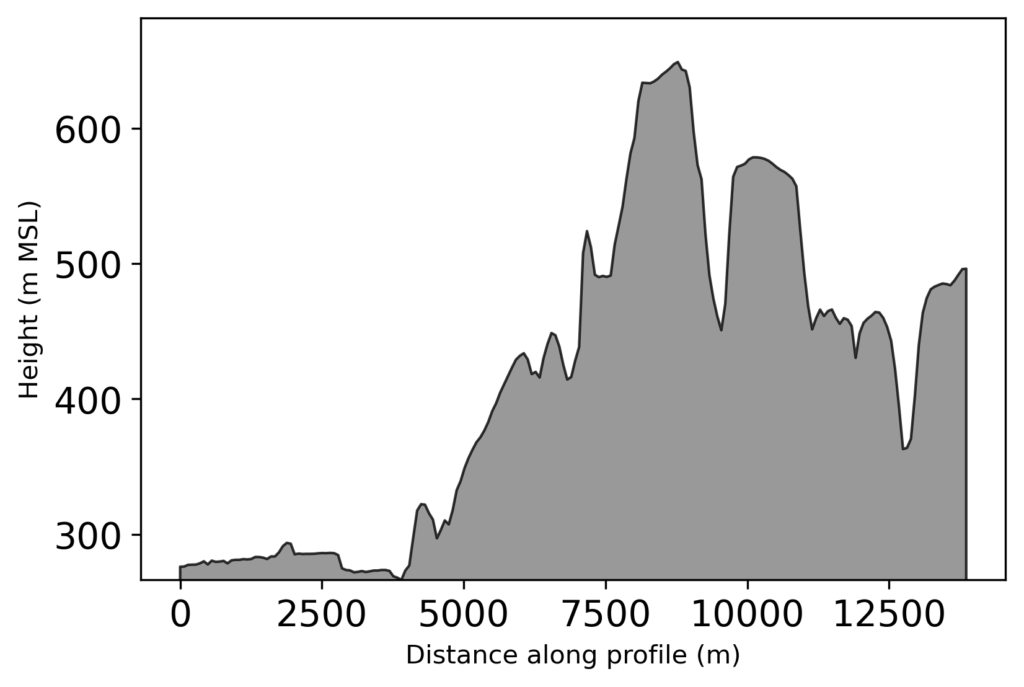
Use the swisstopo API to get a profile of altitudes with the function get_swisstopo_elevation_profile by passing coordinates aka “Rechtswert” and “Hochwert” as array/list (any iterable should do). The gist on GitHub should always be the most up-to-date version

Python
def get_swisstopo_elevation_profile(coords, # a path (2+ points in the form)
                                    kind='csv',
                                    # three heights are available for JSON
                                    # COMB, DTM2, DTM25
                                    which='COMB',
                                    asnumpy=True,
                                    quiet=True,
                                    opts={"sr": None,
                                    "nb_points": None,
                                    "offset": None,
                                    "distinct_points": True,
                                    "callback": None,
                                    }
                                    ):
    """
    Call the swisstopo API for altitude data along a path.
    Pass in a list or array of coordinates in EPSG 2056 (LV95) or 21781 (LV03)
    to get altitude values along the provided path. For options see keywords or
    parameters of call via swisstopo API.
    Parameters
    ----------
    coords : list or numpy array
    The coordinates in either EPSG 2056 (LV95) or EPSG 21781 (LV03).
    kind : str, optional
    Which API backend should be queried. Available are json and csv.
    If none of these are passed properly, fallback is csv.
    The default is 'csv' (easier structure to parse).
    which: str
    If kind is json, three altitude values are available, DTM2, DTM25 and
    COMB(INATION).
    asnumpy : bool, optional
    Whether to return a numpy array.
    The default is True.
    quiet : bool, optional
    Whether to quiet the output (True) or not.
    The default is True.
    opts: dict
    Further keywords than can be passed to the API call, see
    https://api3.geo.admin.ch/services/sdiservices.html#profile
    Returns
    -------
    list or numpy array
    The returned points, in the form of distance along path, altitude,
    coordinates.
    """
    import requests
    import numpy as np
    if len(coords) >5000:
        if not quiet:
            print('Warning, number of coordinates exceeds swisstopo API max number of points, reduce coords beforehand.')
        return np.asarray([]) if asnumpy else []
    payload ='geom={"type":"LineString","coordinates":['
    payload +=','.join([f"[{coord[0]},{coord[1]}]"
    for coord in coords])
    payload +=']'
    opts =','.join(['"'+str(key)+'"'+':'+'"'+str(opt)+'"' for key, opt in opts.items() if opt is not None])
    if opts:
        payload +=','+ opts
        payload +='}'
    kind = kind.lower()
    if kind.lower() not in ['csv', 'json']:
        if not quiet:
            print('Only csv or json can be chosen, autoselecting csv')
        kind ='csv'

    baseurl ="https://api3.geo.admin.ch/rest/services/profile."+ kind

    try:
        profile = requests.get(baseurl, params=payload)
    except ConnectionError:
        if not quiet:
            print('Connection timeout')
            return np.asarray([]) if asnumpy else []
    if profile.ok:
        if not quiet:
            print('Success')
    else:
        if not quiet:
            print('Failed')
    if kind =='csv':
        profile = profile.text.split('rn')
        # Distance, Altitude, Easting, Northing -> not needed
        # header = profile[0]
        profile =list(map(lambda x: [float(j.strip('"')) for j in x.split(';')],
        profile[1:-1]))
    elif kind =='json':
        profile = [[p['dist'], p['alts'][which], p['easting'], p['northing']] for p in profile.json()]
    if asnumpy:
        profile = np.asarray(profile)
    return profile

if __name__=='__main__':
    # straightforward example usage
    rw=[2611025.0, 2620975.0, 2633725.0]
    hw=[1266400.0, 1256750.0, 1250000.0]
    profile = get_swisstopo_elevation_profile(list(zip(rw, hw)))
    import matplotlib.pyplot as plt
    plt.figure(figsize=(10, 5)) 
    plt.fill_between(profile[:,0], 
                     profile[:,1],
                     facecolor='grey',
                     edgecolor='k',
                     alpha=0.8)
    plt.xlabel('Distance along path [m]')
    plt.ylabel('Altitude [m]')
    plt.ylim(min(profile[:,1]), None)

Background/motivation

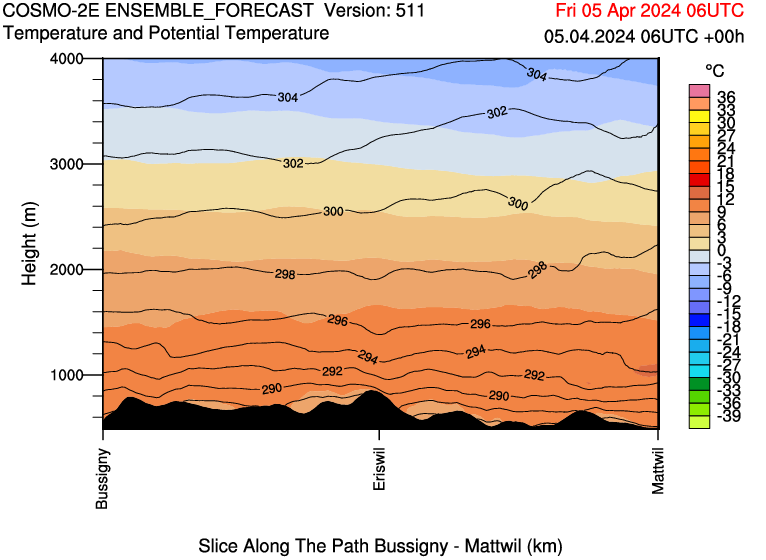
For the CLOUDLAB project we regularly get forecasts that contain a profile at the bottom of the figure from MeteoSwiss that illustrates the terrain nicely (albeit, sometimes it is missing for unknown reasons):

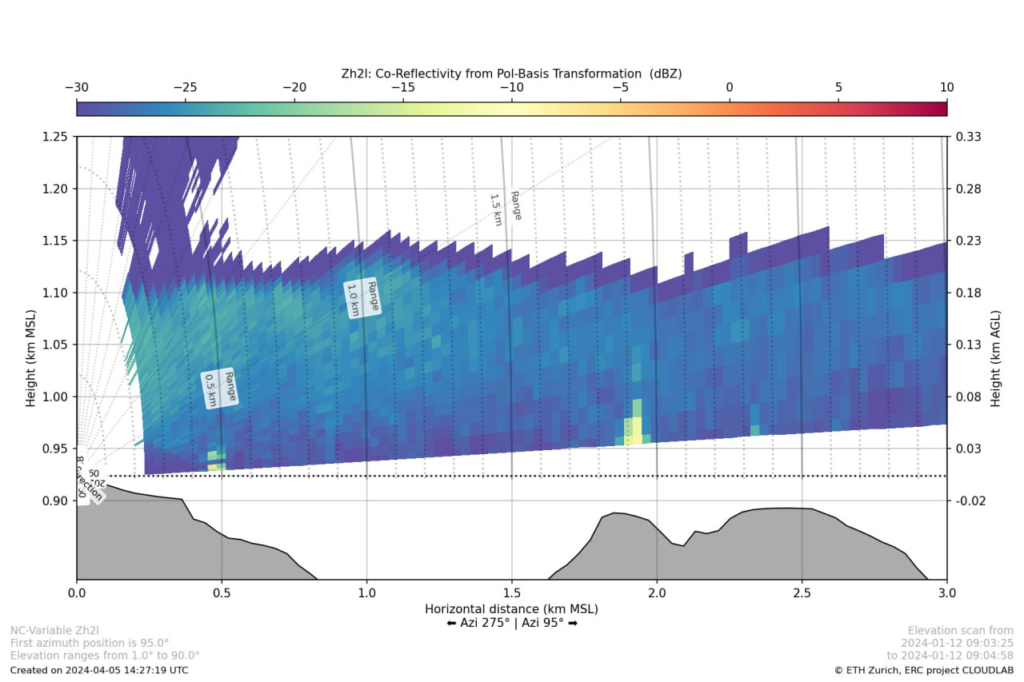
Similarly, I produced a lot of figures of our scans and depending on azimuth and elevation they may be affected by ground clutter, e.g. at a distance of 2 km the increased reflectivity is caused by the terrain below (the hill at around 800 m above sea level). As you can see, I added the terrain already.

Initially, I thought I’d have to get the actual DEM for the area, find the path matching the scan direction and calculate the profile myself. While this might actually be a bit more accurate with a good DEM, it would be more work, not be transferable and mean I’d have to have extra data around. Instead, I realized that swisstopo offers the measure tool on map.geo.admin.ch and uses their own API with a matching request. So I choose to use this as I’m already adding the coordinates for the scan and it is relatively straightforward (min/max of lowest elevation scanline) to get the path we need. The main issue I faced was a misformatted quote that came from copy-pasting the swisstopo example. After finally figuring this out after a detailed URL decode and string comparison the function is relatively lean and can use either the JSON or the CSV backend of the API and by default gives you out a numpy array which can be visualized with ease and can look as follows:

I hope this helps someone to get a profile to enrich their Python (or other) graphs when measuring in Switzerland. In the likely case that you aren’t doing something in Switzerland it might be worthwhile to check out the Google Maps Elevation API (for which you need an API key and billing enabled)